.eds
Thermo Fisher QuantStudio
Run files from the QuantStudio family, with plate setup, raw fluorescence, amplification and melt data.
qPCR analysis for Mac and Windows · QuantStudio, LightCycler, Rotor-Gene, RDML
Drop in the original run file, not a CSV export. CycleView draws every amplification and melt curve, lets you reset threshold and baseline, runs ΔΔCt with your reference genes, and exports figures ready for the paper. On your laptop, at home or on the train.
Get CycleView
Mac and Windows · runs locally · for research use, not for diagnosis.
How it works
Drag in a QuantStudio .eds, a LightCycler .ixo or .lc96p, a Rotor-Gene .rex or an RDML file. The plate layout, sample names, targets and raw fluorescence come in with it. No CSV export step.
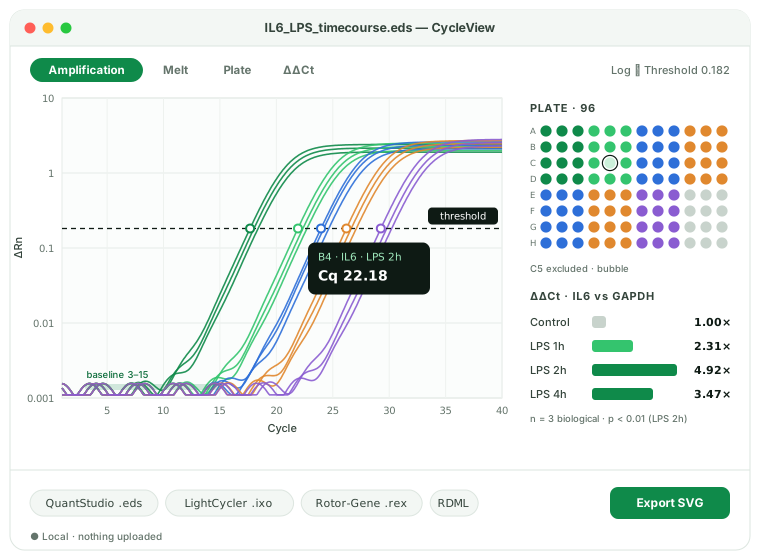
Every well's amplification and melt curve, on a log or linear axis. Set the threshold and baseline per target, exclude a bad replicate with a click, and watch Cq update.
Pick reference genes and a calibrator, get ΔΔCt fold changes with error bars and statistics, then export SVG/PNG figures and RDML or CSV for your supplementary data.
QuantStudio .eds, LightCycler .ixo / .lc96p, Rotor-Gene .rex and RDML open directly, with plate layout and raw data intact.
Every well, overlay or split by target, with Tm peaks on the derivative melt plot.
Adjustable threshold and baseline per target, so you can defend the Cq values in your methods section.
Multiple reference genes, a calibrator group, replicate handling, fold change with SD and a t-test or ANOVA across groups.
Bar charts and curve plots in SVG and PNG, sized for a journal column, with consistent colours per target.
Hand reviewers and collaborators an open, MIQE-friendly RDML file instead of a vendor format they cannot open.
Formats
Open the file the instrument wrote, from any of these platforms. Vendor names describe compatibility only.
Run files from the QuantStudio family, with plate setup, raw fluorescence, amplification and melt data.
LightCycler 480 experiment files (.ixo) and LightCycler 96 run files (.lc96p).
Rotor-Gene Q run files, with the rotor layout, raw fluorescence and melt data.
The open Real-time PCR Data Markup Language, from any instrument or tool that exports it. CycleView reads and writes it.
CycleView vs the alternatives
Vendor software reads its own files on its own PC. Free tools run anywhere but start from a CSV. CycleView starts from the run file and ends at the figure.
| Vendor software | Qraphics | LinRegPCR / ProntoPCR | CycleView | |
|---|---|---|---|---|
| Opens original run files | Own brand only | — | — | ✓ |
| Several instrument brands in one app | — | — | ✓ | ✓ |
| Runs on Mac | Mostly no | ✓ | Partly | ✓ |
| Recompute Cq (threshold, baseline) | ✓ | — | ✓ | ✓ |
| ΔΔCt with reference genes and stats | ✓ | ✓ | Partly | ✓ |
| Publication-ready SVG figures | — | ✓ | — | ✓ |
| Price | Bundled | $29.99 | Free | Free viewer · Pro $12/mo |
LinRegPCR is excellent for amplification-efficiency work, and we recommend it for that. CycleView is for the everyday loop: open the run, check the curves, get the fold changes and the figure.
Pricing
The viewer is free on every computer, for good. Pro adds Cq recomputation, ΔΔCt, figures and export.
$0
Open and inspect any supported run file.
Get CycleView
Mac and Windows · runs locally · for research use, not for diagnosis.
$12/ month
Or $99 a year. For the person doing the analysis.
Get CycleView
Mac and Windows · runs locally · for research use, not for diagnosis.
$49/ month
Five seats for a group or a core facility.
Get CycleView
Mac and Windows · runs locally · for research use, not for diagnosis.
Prices in USD. Pro yearly is $99, about two months free.
CycleView runs locally. Run files are opened and analysed on your own machine and are never uploaded to a server, so unpublished results, patient-derived research samples and anything under a data agreement stay where they are. It also means it works offline, in the cold room or on a plane. CycleView is for research use, not for diagnosis.
Enter your email and we send you the download for Mac or Windows. The viewer is free.
Get CycleView
Mac and Windows · runs locally · for research use, not for diagnosis.
Open it in CycleView. QuantStudio .eds run files open directly on macOS with the plate layout, amplification and melt curves, with no Windows virtual machine and no CSV export from the instrument PC.
It is an independent analysis app that reads QuantStudio .eds files on Mac and Windows. It is not made by or affiliated with Thermo Fisher. Use the instrument software to run the plate, and CycleView to analyse it anywhere.
For analysis, yes: curves, Cq with your own threshold and baseline, ΔΔCt, figures and export. Plate setup and running the instrument stay in the vendor software.
Yes. LightCycler 480 .ixo experiment files and LightCycler 96 .lc96p run files open on Mac and Windows.
Yes. Open the .eds file and export RDML, the open format recommended alongside the MIQE guidelines, for supplementary data or for collaborators on other instruments.
Yes, with one or more reference genes, a calibrator group, replicate averaging and statistics. Pick the targets and groups and the fold-change chart builds itself.
Bio-Rad .pcrd files are encrypted, so CycleView does not open them. Export RDML from CFX Maestro and open that.
No. Everything runs on your computer. Nothing is sent to a server.
No. CycleView is for research use, not for diagnosis, and is not a medical device.